Create Audit
Audits module can be used to perform various types of audits. To create a new Audit, follow these steps:
- Hover over the Audits module and click New Audit.

You will be directed to the Create Audit page.
- Select project by clicking on Select Project field.
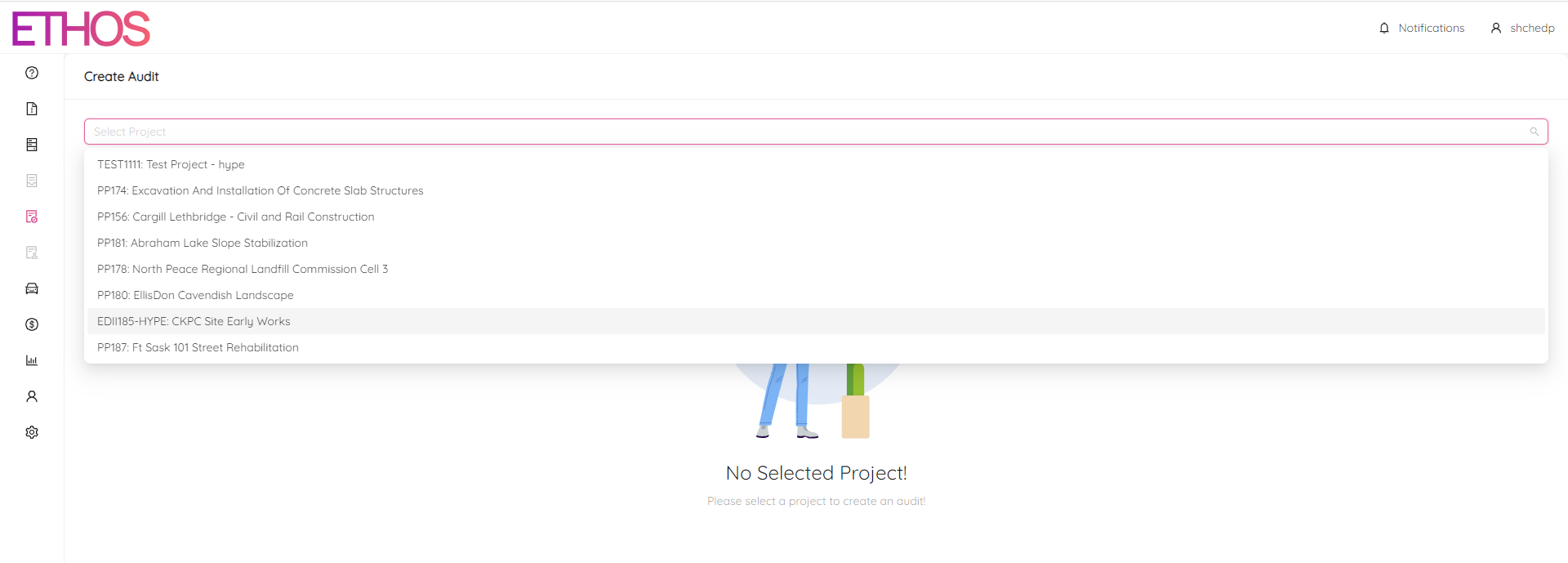
NOTE: You can search among the projects simply by typing your request in.
- Fill in all required fields marked with an asterisk (*). The audit attributes are described below.
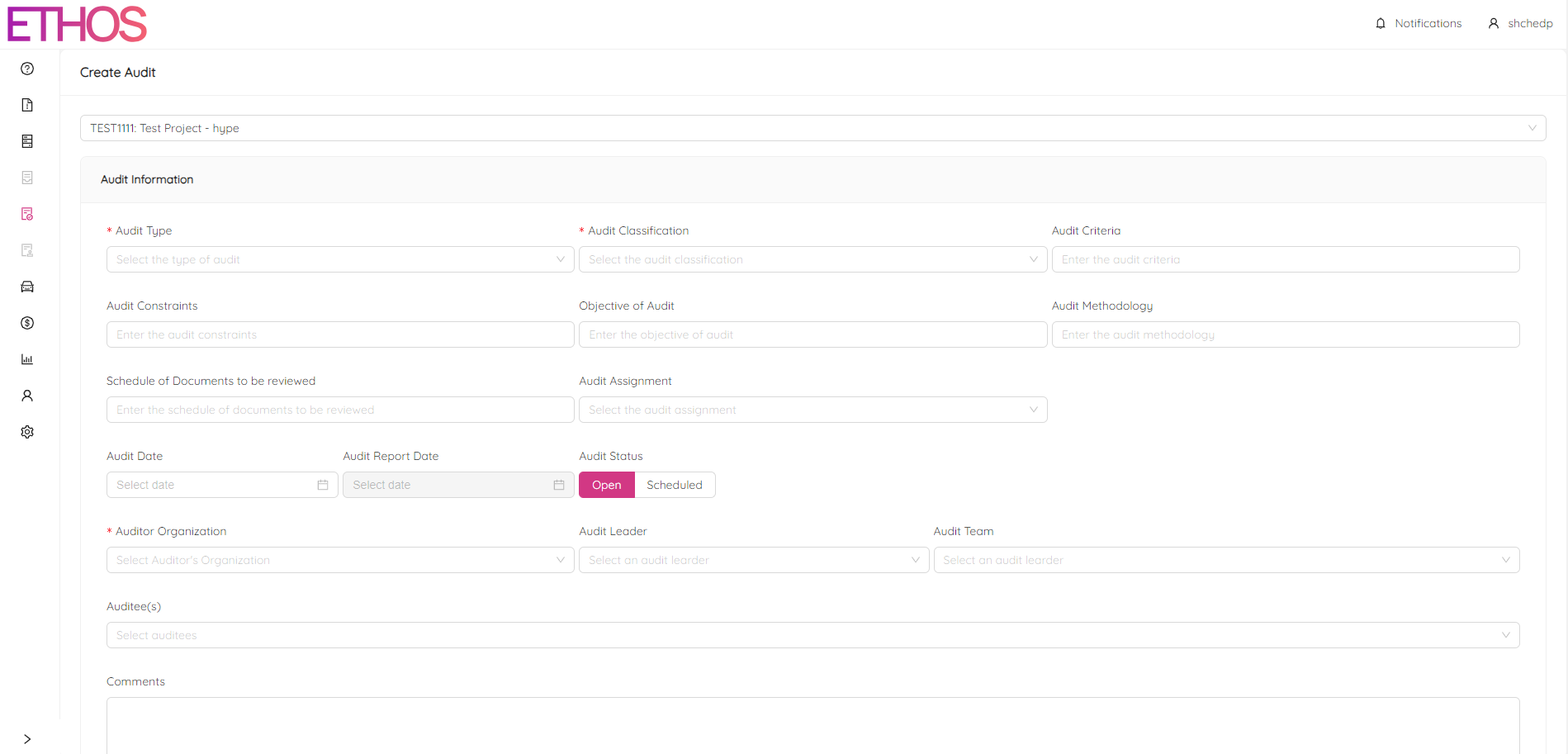
Audit Type
Select one of the following audit types. You can select multiple types of audits as applicable.

Process Audit: evaluation of current activity against predetermined procedures or instructions and measure conformance to those standards and effectiveness of the instructions.
Product Audit: evaluation of a particular product or service on conformance to requirements (Code, Regulatory, Specification, Customer Requirements).
System Audit: evaluation of a management system (verification that the system is in conformance with company policies, regulatory requirements, and any applicable contract terms).
Audit Classifications
Select one of the following audit classifications:
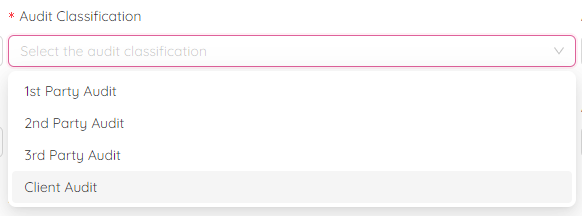
1st Party Audit: The company internally measures its strengths and weaknesses against its own procedures and processes, as well as against relevant external standards such as regulatory requirements, contracts, and certifications.
2nd Party Audit: The company conducted external audit of a supplier to assess their strengths and weaknesses in relation to their own procedures and policies, as well as the contract rules. The aim was to confirm their ability to carry out the scope of work.
3rd Party Audit: performed by an auditing party independent of and Client. Third party audits relate to certification, registration, recognition, etc.
Client Audit: the client may perform an audit activity, which can be done by either a current or future client. The purpose of this is to identify strengths and weaknesses in relation to copmany's procedures and processes, as well as applicable external standards such as regulatory, contract, and certification requirements.
Audit Criteria
Audit criteria refer to the expected standards or requirements that need to be met for an audit to be conducted again. For instance, this could include verifying quality records through an Inspection and Test Plan, ensuring that the EPP (Environment Protection Plan) or Safety Plan is being implemented, or confirming that Wildlife Culvert Installation has been completed using the Culvert Installation Checklist. It's crucial that audit criteria are pre-established.
Audit Constraints
Constraint are some kind of limitations such as Audit Time (Duration), Virtual Audit, Site Access, Any Specific Resource etc.
Objective of Audit
The audit objective is the purpose of conducting an audit. It aims to achieve specific goals such as ABSA Certification, ensuring that quality records saved in job folders meet ITP and project requirements, ensuring the implementation of the cold weather backfill procedure, continuous improvements, and confirming that requirements are being met. Objectives should be specific and clearly defined.
Audit Methodology
The audit methodology refers to the approach used to conduct an audit. This may include reviewing documents in the job folder, conducting virtual interviews with project personnel through Teams, or visiting the site in person.
Schedule of Documents to be reviewed
Refers to the documents that should be reviewed for this audit. Examples include a general cross-section of documents and processes. If there are any specific documents, such as verification documents identified on the ITP, they should also be included. If auditing a specific activity, such as survey verifications, relevant documents such as as-built survey files and survey records should be reviewed.
Audit Assignment
When assigning audits, it's important to consider the system being audited, the job stage, and whether the auditee is a supplier or subcontractor. Simply select the appropriate audit assignment from the dropdown menu. You can select only one audit assignment.
Quality Management System Audit - evaluation of the quality management system (verification that the system is in conformance with company policies, regulatory requirements, and any applicable contract terms).
Environmental System Audit - evaluation of the environmental management system (verification that the system is in conformance with company policies, regulatory requirements, and any applicable contract terms).
Safety System Audit - evaluation of the safety management system (verification that the system is in conformance with company policies, regulatory requirements, and any applicable contract terms).
Subcontractor / Supplier Audit - external audit performed by the company on a supplier measuring strengths and weaknesses against the suppliers’ own procedures and policies and/or the rules of the contract.
Project Audit - this audit is typically performed during a project, possibly multiple times at a predetermined frequency. This audit may also be performed after project completion leading to possible identification of lessons learned and other supports for continual improvement.
Pre-Award Audit - pre-award audits may be performed by a potential client to assess our ability to complete a particular scope of work (qualification for a potential client).
Pre-Construction Audit - Evaluation of preparedness to manage the construction of a particular project (assess safety, quality, environmental, project controls, etc.). This audit supports a philosophy of preventing problems, anticipating, and controlling project schedule impacts, avoiding cost overruns, etc. leading to more proactive thinking and identification of contract leakage before construction starts.
Risk Assessment Audit - specific evaluation, identification, and analysis of relevant risks. This may be applied to overall objectives and company general. Scope of work or could be applied specifically to a project.
Certification Audit - evaluation by an auditing party independent of the copmany and Client leading to certification (Jurisdictional Authority, Canadian Standards Association, etc.).
Registration Audit - evaluation by an auditing party independent of the company and Client leading to certification (ISO 9001 assessment / registration).
Surveillance Audit - periodic audit performed by an external auditor to ensure compliance to standard requirements (CSA, ISO, Jurisdictional Authority).
Audit Date
Audit date is the date when audit is performed.
Audit Report Date
The audit report date is the date when the audit report is finalized and provided to key personnel involved in the audit, such as the auditee, auditor and audit team. You must select audit date to select audit report date. Audit Report Date can be specified later.
Audit Status
Audit Status will show as Open until closed. If you want to schedule an audit on any other date, then click on the Scheduled button, and the Scheduled Date box will pop up to enter the scheduled date. Click on Select Date to choose the audit scheduled date.
Auditor Organization
Auditor Organization is the name of organization who is auditing. If the organization name you're looking for isn't available in the drop-down list, you can contact the Project Admin to have it added.
Audit Leader
The audit leader is the person who leads the audit team. If only one auditor is conducting the audit, they may also be the leader. To assign a leader, they must be an ETHOS user. If the user you want to select is not available in the drop-down menu, please contact the Project Admin. You can choose only one audit leader.
Audit Team
The individuals who will conduct the audit, including interviewing and questioning, should be chosen as the audit team. It is possible to choose multiple individuals for this role.
Auditee(s)
Auditees are individuals who will be interviewed or asked questions as part of the audit process. Multiple names can be selected for the role of auditee.
Audit Comments
The comments box can be used to specify any additional information about the audit.
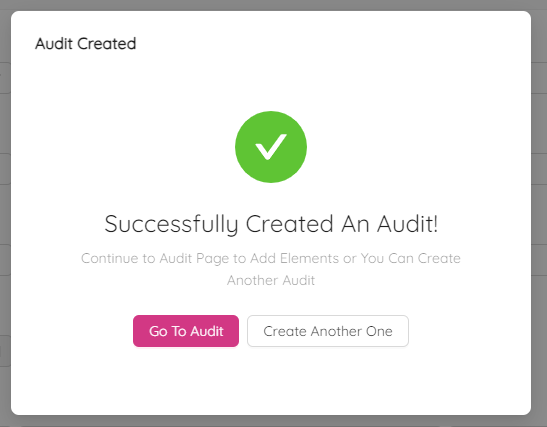
Click on the Create button to create the audit. After confirming by clicking Yes you will see the Audit Created message box. You can proceed to the newly created audit by clicking the Go To Audit button or just click on Create Another One.