Closing an NCR
Once an implementation of corrective and preventive actions are verified by all assigned verificators, the Project Administrator can close the NCR.
-
Scroll to the bottom of the page and there is a section to "Leave a Comment."
-
Type your Response (if required) and use any formatting as required. If you click on "Clarify", NCR will go back to coordination stage to start over. NCR will reamin not CLOSED.
-
Click on "Close."
NOTE: You can close NCR without Actual Impact and verification also. However, it is important to provide a reason for why NCR verification was not performed and on what basis the NCR is being closed.
-
A window will pop up confirming the closure of the NCR and asking to check completion and review of the Verification and Actual Impacts.
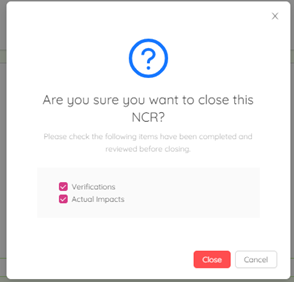
- Check mark on Verifications and Actual Impacts if those are completed and reviewed and click on "Close".
NCR status will be changed to "Closed" and applicable parties assigned to the NCR will receive an email notification for your response.

NOTE: As shown in the above snip shot NCR Actual Impact section is not initiated, and the verification section is initiated but not completed still NCR ABC1234(I)-NCR-21 can be closed. NCR ABC1234(I)-NCR-21 verification status (Pending) and Actual Impacts (Not completed) are reflected on the NCR log in the below snip shot.
