NCR Assignment
Assign Coordinators and Alias
IMPORTANT NOTE: Assigning coordinator is only mandatory to submit NCR for coordination. Responsible party, Issuers, and Approvers can be assigned in next stages.
Coordinator is a representative from the project team who is responsible to direct the created NCR to appropriate parties such as responsible parties and approvers. Typically, PM or PC could be coordinator.

-
Click on "Edit" icon
 beside "Coordinators" and "Assign Coordinators" box will open to add coordinators.
 -
Click on “+ Add Coordinator” to add coordinators. You will be able to select User and Alias clicking on drop down arrow.
User: User is the person who will be using ETHOS system for any specific stage. For coordination stage user is assigned coordinator who will be coordinating this NCR.
Alias: An alias is a person using the ETHOS system on behalf of someone else who does not have access to the system or has chosen not to use it for some reason.
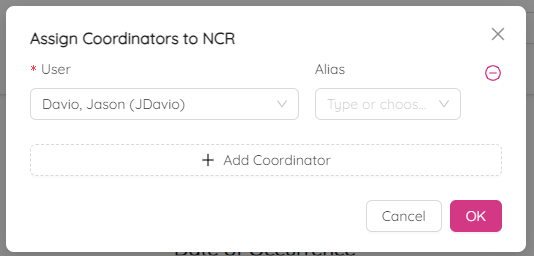
You can add as many coordinators as you want by clicking on “+ Add Coordinator”.
You can remove the selected coordinator by clicking on (-).
- E-mail will be sent to assigned coordinators.
Assign Responsible Party(s)
Responsible Party(s) in the NCR process is the party responsible for the nonconformity and the associated corrective action. Responsible Party(s) is responsible to propose a Recommended Disposition for the NCR(s) issued.
NOTE: Responsible party also can be assigned later at the time of “Submit for Recommendation”.

-
Click on "Edit" icon
beside "Responsible Party" and "Assign Responsible Party Members" box will open to add responsible persons. -
Click on “+ Add Responsible Party Member" to add responsible persons. You will be able to select User and Alias clicking on drop down arrow.
User: User is the person who will be using ETHOS system for any specific stage.
Alias: An alias is a person using the ETHOS system on behalf of someone else who does not have access to the system or has chosen not to use it for some reason.
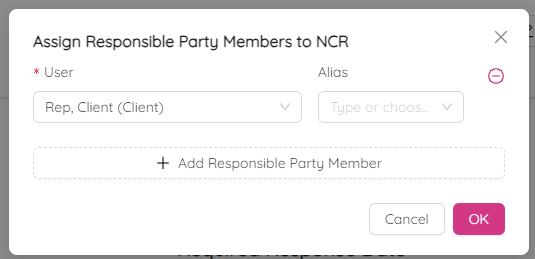
You can add as many responsible persons as you want by clicking on “+ Add Responsible Party Member".
You can remove the selected responsible person by clicking on (-).
- E-mail will be sent to assigned responsible person.
Assign Issuer(s)
Issuer(s) in the NCR process is the originator of the NCR who has raised this nonconformity. Issuer creates and issues the NCR to the responsible party. The originator of the NCR may be a representative from the project team or client/owner. Issuer shall propose the Actual Disposition based on Recommended Disposition provided by the Responsible Party.
NOTE: Issuers also can be assigned later at the time of “Submit for Recommendation”.

-
Click on "Edit" icon
beside "Issuers" and "Assign Issuers" box will open to add issuers. -
Click on “+ Add Issuer" to add a new one. You will be able to select User and Alias clicking on drop down arrow.
User: User is the person who will be using ETHOS system for any specific stage.
Alias: An alias is a person using the ETHOS system on behalf of someone else who does not have access to the system or has chosen not to use it for some reason.
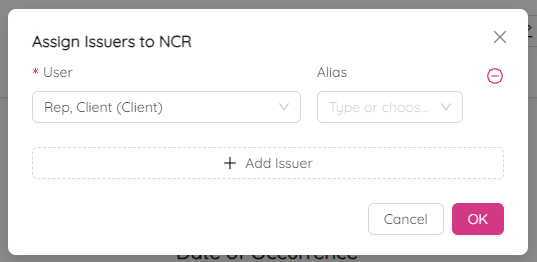
You can add as many issuers as you want by clicking on “+ Add Issuer".
You can remove the selected issuer by clicking on (-).
- E-mail will be sent to assigned issuers.
Assign Approver(s)
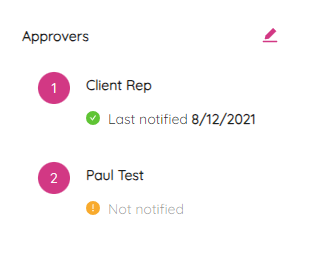
Approvers are the individuals responsible for approving the disposition of the NCR. Issuer and Responsible party should both function as Approvers to agree upon disposition for the NCR. All other parties that may be interested to approve the NCR disposition can also be added as an Approver.
NOTE: Approvers also can be assigned later at the time of “Recommended Disposition".
-
Click on "Edit" icon
beside "Approvers" and "Assign Approvers" box will open to add approvers. -
Click on “+ Add Acceptor" to add a new approver. You will be able to select User and Alias clicking on drop down arrow.
User: User is the person who will be using ETHOS system for any specific stage.
Alias: An alias is a person using the ETHOS system on behalf of someone else who does not have access to the system or has chosen not to use it for some reason.
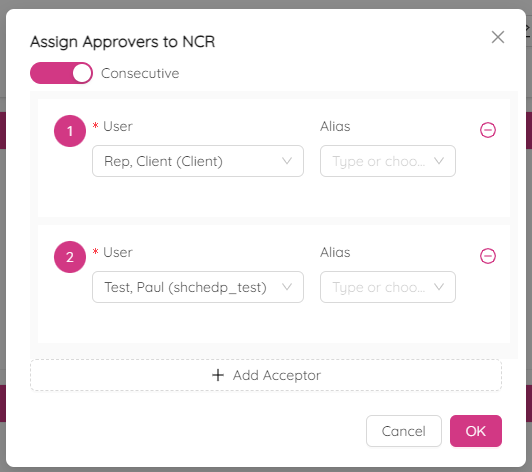
You can add as many approvers as you want by clicking on “+ Add Acceptor".
You can remove the selected approver by clicking on (-).
- E-mail will be sent to assigned approvers.
Consecutive approvers are additional approvers such as consultant, city representative, third party inspection. If primary approver assigns or relying additional approver, then consecutive approver option to be selected.
Click on "Consecutive" toggle switch to make the approvement consecutive. You can change the order of approvers by dragging them up and down.